
Blogging has become integral to many businesses, allowing potential customers to connect directly. It leads to more business for the company and helps develop relationships with potential customers.
This article will explain how to start a high-quality blog from the beginning.
How to Create a Blog Post on WordPress
There are a few points to creating a blog post on WordPress.
- Add a new post
- Add content
- Format the post
- Preview the post
- Publish the post
Here, all the points explain briefly.
1. Add a New Post
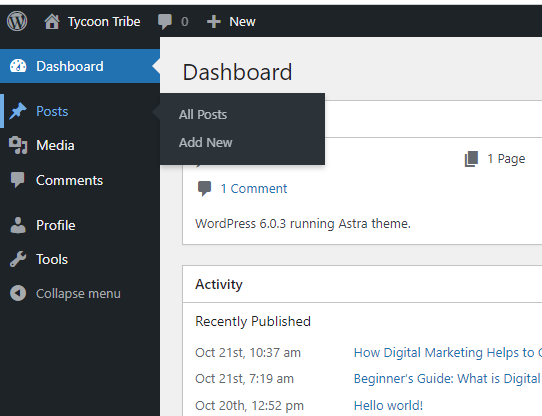
To assist you in launching your WordPress blog, we’ve provided a template you may use as a starting point. To begin, visit your WordPress dashboard and click “Posts” in the sidebar. In the resulting dialogue box, choose the option labeled “All Posts.”
Tip: As your blog develops, there may come a time when you want to select multiple articles at once. You can do this by clicking the “Bulk Actions” button on the All Posts homepage.
2. Add Content
You’ve appeared at the blank canvas where you may add your creation (AKA your content). However, there are a few things to consider before beginning this process. Permanently save your work regularly. WordPress automatically stores your work, but it might not reload your most recent changes if you lose your internet connection. To save your work, click the “Save draft” button that is located in the upper right-hand corner of the screen.
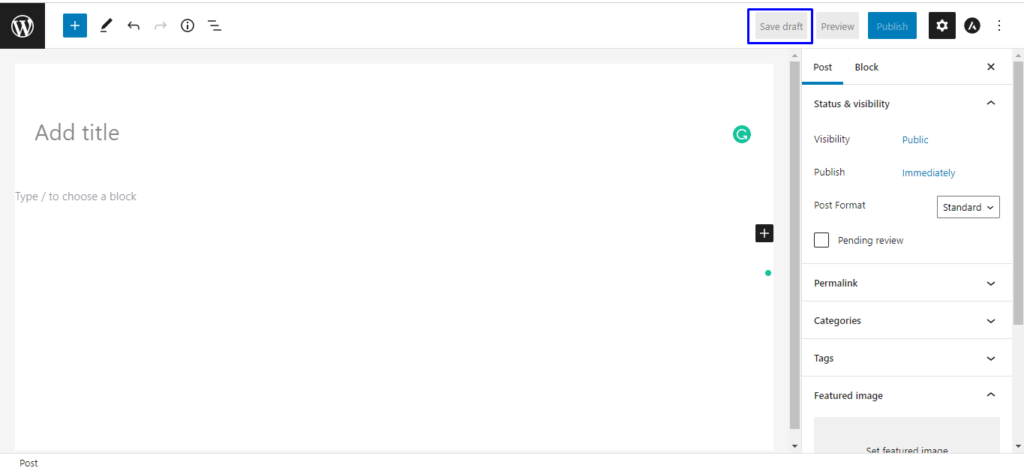
At this point, you should add the content you want to display. Simply copy and paste the text from your original post into WordPress to do this.
WordPress uses a block editor to add new text sections, which works just as you’d think: by creating various blocks. Paragraphs, pictures, and headings will all be organized.
Tip: Create a rough draught of your post elsewhere before importing it to WordPress, so you don’t have to worry about formatting, revising, and writing all at once.
3. Format the Post
In other words, good writing isn’t enough; your information also needs to be well-organized. Your audience is likelier to exit a page soon if it contains no formatting and only big blocks of text (therefore impacting your bounce rate). Follow these instructions to make sure that your content is displayed correctly.
- Heading
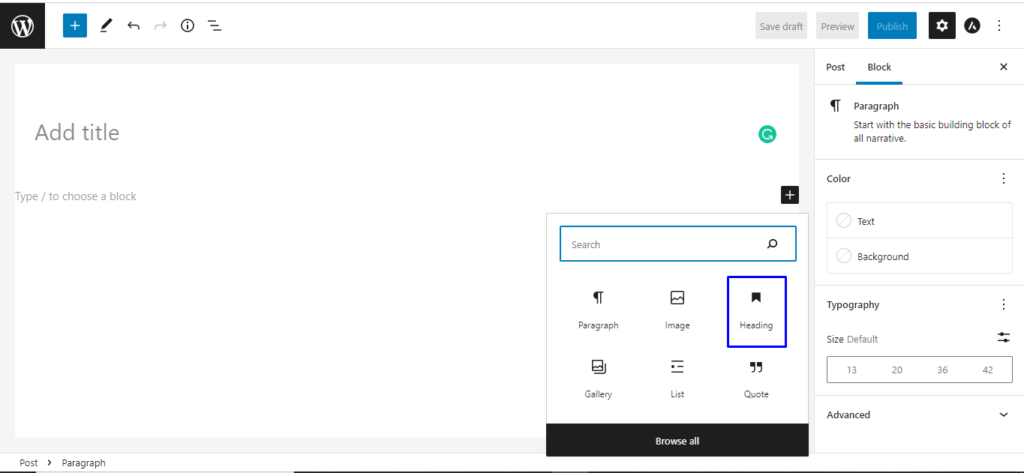
Use headings to organize your blog posts. Heading provides a hierarchical signal to the reader (and the search engines) about the essential information on the page. It’s a win-win situation because your readers and search engines will benefit from it.
The procedure is as follows: The page’s title, which is also its H1, is located at the very top of the page, at the very top of the hierarchy. One H1 tag is all that’s allowed in a blog entry. Including more could confuse both Google and the reader.
A subheading is an H2. Depending on the length of your post, you could have anywhere from one to all three of them. After H1s, H2s come next in a blog post’s hierarchy. It’s always an H1 or lower. Similarly, H3s are placed below H2s in the hierarchy. Keep in mind that an H3 is similar to a subheading. There is a consistent format used for successive headings.
- Images
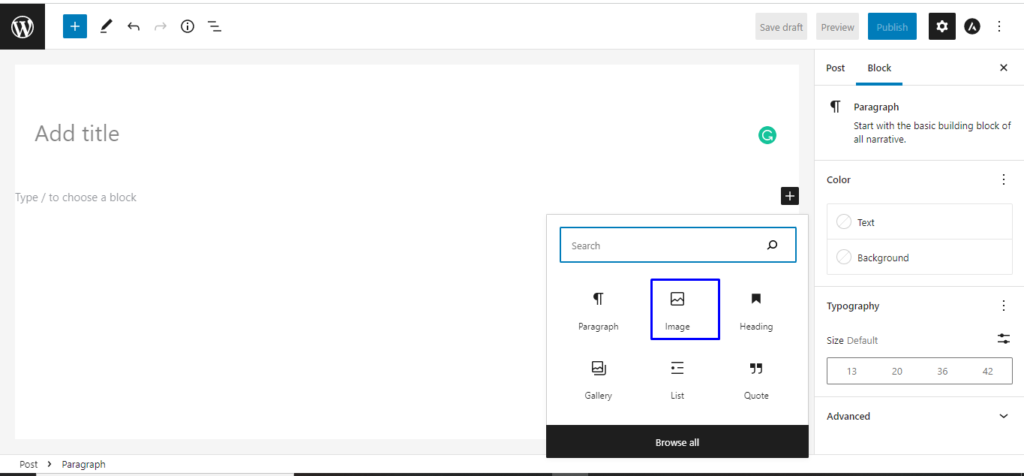
Remember that properly formatted images can also help your audience browse your blog content. In WordPress, it’s simple to change the format of photos. The steps necessary to achieve this are detailed below.
Choose your photo and then look for the pop-up menu. Click the button showing three horizontal lines to open the formatting menu. The next step is to select an alignment method. Let’s maintain a centered arrangement for the images in this post.
4. Preview the Post
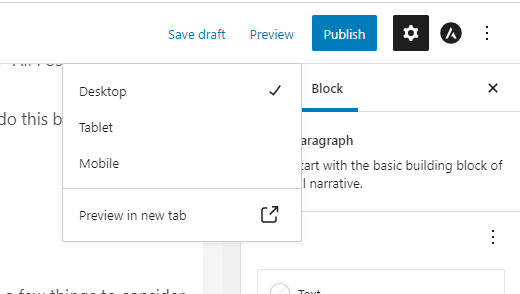
You’ve included all the components—text, graphics, links, and formatting—to make the reading experience enjoyable and straightforward Before publishing.
To begin, click the “Preview” icon in the upper right. Then select the device type to see a preview of the post on your computer, tablet, or mobile phone. We went with “Desktop” for this one. To finish, select “Preview in a new tab.”
5. Publish the Post
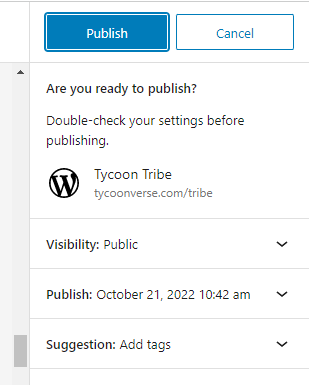
Click the “Publish” button in the upper right to make your post public. There are several publishing options available; choose “Public” if you want this post to be viewable by anyone on the web.
- Schedule for a Future Date or Time
The next step is to specify when you’d like your post to go live, immediately or later. It’s up to you whether you hit “publish” right now or set a future date. A scheduled blog post will publish at the specified time and date.
- Add Tags
As the last step, you’ll be able to add tags. They allow your viewers to quickly find other posts that cover similar topics. You can quickly leave these sections blank without a system for categorizing tags.
How to Create Quality Blog Content on WordPress
There are a few points to creating quality blog content on WordPress.
- Choose your topic
- Choose Hosting Provider and Select Domain Name
- Select and customize your theme
- Create high-quality content
- Optimize your posts for search engines
Now that you know the basics of how to write a blog post on WordPress, we’ve put together a complete guide to writing good blog posts on WordPress. These tips will help you organize your ideas, plan your content calendar, and make your posts better for search engines.
1. Choose Your Topic
Before you start writing, you should know just what your blog is about. Most likely, your blog will be an extension of your business, so think about what your site visitors might want to read. Even though that helps you narrow down your choices, there are other things to think about. The best way to choose a topic is to find one that is related to your business and industry but is also broad enough to go into more depth.
When choosing a topic for your blog, think about the people you want to reach. Ask yourself about the job titles (or roles) of your audience, their specific needs, and what they would really hit with them.
Make buyer personas to help you answer these kinds of questions. These made-up versions of your ideal readers can help you plan and write content that fits their goals, habits, and worries. This kind of strategic content creation and mapping will help make sure that the right people read your blog.
2. Choose Hosting Provider and Select the Domain Name
If you want to broadcast your blog, WordPress is a great choice because it has a powerful CMS that will help you publish and manage content.
There are a few various configurations that it can take. First, as was already said, a blog can be its own website. If that’s how your business works, you’ll need to register a root domain like yourblog.com. But a lot of businesses want to make a blog that lives on their company website.
You have two choices if you want your blog to be part of your company’s website. You can create either a subdomain or a subdirectory. Subdirectories are parts of your domain that hold pages from your website.
Let’s take a closer look at how subdomains and subdirectories are different. How WordPress makes its URLs is the most important difference. Your root domain includes subdomains. If you make your blog a subdomain of your site, the URL for a blog post will look like this: blog.yoursite.com/blog-post-title. If you set up your blog to run in subdirectories, the URL for a blog post would look like this: yoursite.com/blog/blog-post-title.
3. Select and Customize Your Theme
How do you select a suitable WordPress theme for your blog? First, consider what. If you’ve installed the latest version of WordPress, the default theme for your blog will be Twenty Twenty-Two – a minimalist and lightweight theme you can customize using the Gutenberg editor or another WordPress page builder. When you first install WordPress, your blog will have the default theme activated on it.
This layout may be ideal for your website, but it might not be suitable for other websites. You might, for instance, be interested in having a more specific topic. You have access to hundreds of WordPress themes, both free and paid, through the WordPress theme directory or third-party marketplaces. These themes provide additional colour options, sidebar options, background options, Google Fonts, and layouts.
4. Create High-Quality Content
Maintaining a successful blog highly depends on consistent, high-quality content creation. Even the best-looking blogs will struggle to gain readers if they don’t have relevant and helpful material.
Creating good content isn’t as easy as it seems. Content development has many components, from keywords to graphics to headings to grammar and spelling.
- Keyword Research
- Readability
- Images
5. Optimize Your Posts for Search Engines
If no one can find your great content, what’s the sense in creating it? Only half the battle is a win when running a successful blog: creating and releasing quality material. Search engine optimization (SEO) is a method for raising your blog’s visibility and bringing in new readers. Doing so improves the possibility that search engines will index and display your content to users looking through SERPs (SERPs).
One method to achieve this is to optimize your titles, meta descriptions, and links. These elements are collectively referred to as on-page SEO since readers can see them — you guessed it — on the page. Let’s briefly go deeper into a couple of these crucial characteristics below.
- Titles and Meta Descriptions
The title and meta description of your blog post appear in search engine results pages (SERPs) alongside your URL and can affect whether or not a reader clicks on your content. Use the keywords you want to rank for in your titles and meta descriptions, and ensure they aren’t too short. Keep titles under 60 characters and meta descriptions under 160 characters.
- Internal Links
Including links to similar information within your blog entries will assist both search engines and visitors in understanding the importance and relationship of your site’s content. It also makes your website easier to navigate, which increases the chance that visitors will view more information and remain on your site for longer. You also assist search engines in discovering all of your content on a particular subject, which increases your chances of ranking for keywords linked with that subject.
Conclusion
With just these steps, you can set up your WordPress blog. It’s not difficult for beginners to start a blog with the right WordPress hosting, theme, and interesting and unique entries.
Anyone wishing to write articles about their interests should consider starting a WordPress blog. It is also perfect for businesses that want to establish their expertise and better engage customers about their goods and services.
Suppose you are looking for WordPress Development, Content Marketing, and Digital Marketing. Tycoonverse is the best WordPress Development, Content Marketing, and Digital Marketing Agency in India. They provide all the services for your business.


